
Nivo checks your WebUntis timetable regularly and tells you what’s different: cancelled, covered, room change, moved. See the plan as a week or a day in your browser. Alerts come as browser notifications, on Telegram or to your webhook – or add the plan to your calendar as a subscription. Apps for Android, iPhone, iPad, Apple Watch and Mac are coming.
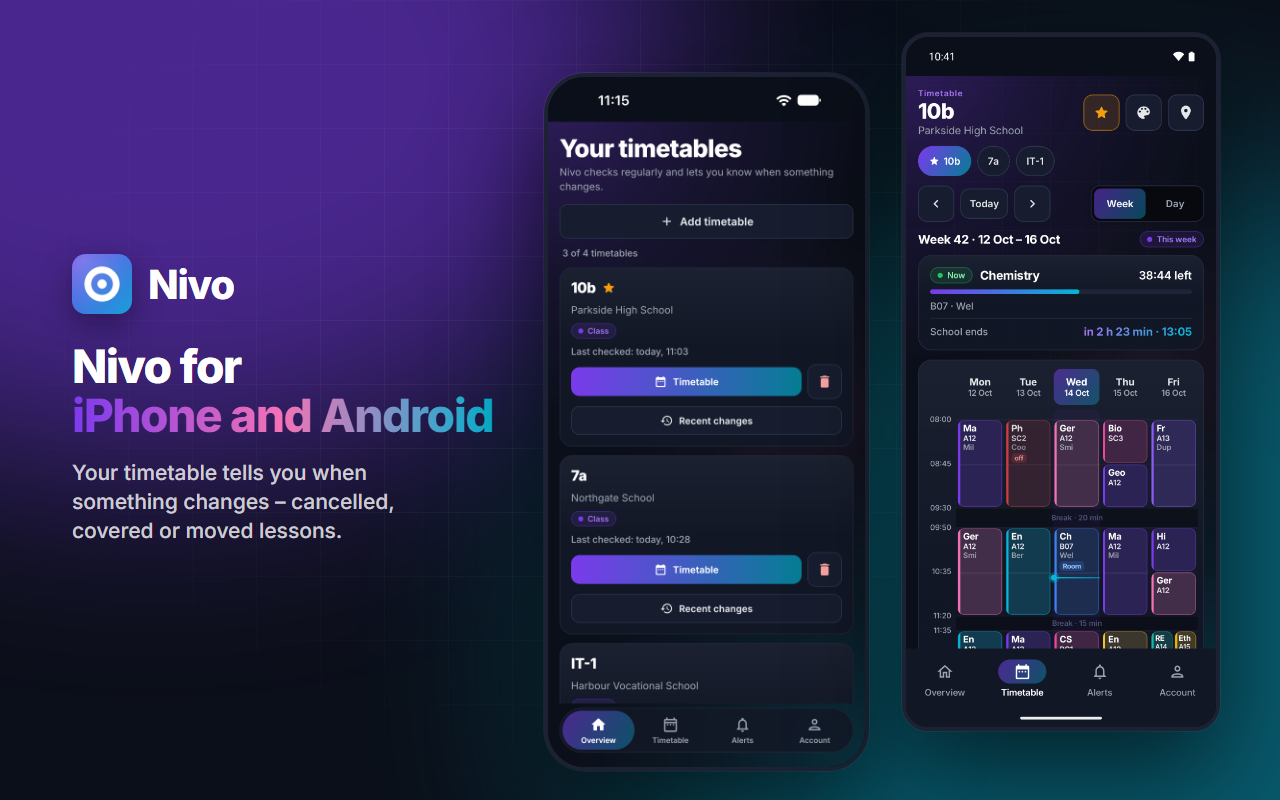
Alerts when your timetable changes
Search for your school or paste a shared WebUntis link, then pick a class, teacher or room. If your school doesn’t publish its timetable, add your own WebUntis login – stored encrypted and only used to fetch your timetable.
Nivo compares against the last state and reports what’s different: cancelled, covered, room change, moved. Several changes arrive together in one alert.
Browser notifications, Telegram or your own webhook – or several at once. Hit “Test” to see right away whether an alert gets through.
Nivo gets in touch at the times you choose or as soon as it finds a change – at most twice a day per channel and never twice within an hour.
A subscription for Google Calendar, Apple Calendar or Outlook that keeps itself up to date. You can have several, each with the timetables that belong there.
Week or day, with the current lesson, a countdown to the end of school, double lessons in one block and colour-coded subjects.
A shared link is all it takes – everyone sets up their own alerts, without anyone else’s login. Several timetables at once work too, say your class and your sibling’s.
Questions, bugs or ideas? Write to us under Support on the Nivo page or in the app under Account → Help & feedback.
No reviews yet – be the first to review Nivo.
 Weekly timetable in Nivo: cancelled, covered and moved lessons are highlighted
 A school day in Nivo: the current lesson with a countdown and every change in one list
 Nivo sends changes as a notification, via Telegram or a webhook – at the times you choose
 Nivo widgets for your home screen: your whole day, your next lesson with a countdown, and Apple Watch
 Nivo on iPad: your week and today side by side
Sign in with your free Winku account or create one.
Search for your school or paste the shared WebUntis link and pick a class, teacher or room.
Set up browser notifications, Telegram or a webhook and try it with “Test”. Only want the calendar? Use the subscription.
At the times you choose or as soon as Nivo finds a change – separately for each channel.
Google Play: coming soon · App Store: coming soon · Mac: coming soon. Until then, Nivo runs in your browser – on your computer, tablet and phone.
There is nothing to install for Nivo — it runs in your browser. All you need is your Winku account.
Open timetableNothing. All you need is a free Winku account. No ads, no tracking.
Only if your school doesn’t publish its timetable. If it does, the link is enough. Logins are stored encrypted and only used to fetch your timetable.
Regularly, in the background. It may alert you at most twice a day per channel and never twice within an hour – otherwise it would be noise rather than information. Nivo is a helper: your school’s official timetable always takes precedence.
Soon. The apps for Android with Wear OS and for iPhone, iPad and Apple Watch are in testing and coming to Google Play and the App Store; the Mac app will follow. Until then, Nivo runs right here in your browser. On iPhone and iPad you get notifications once you add the page via “Share → Add to Home Screen”.
No, saved timetables belong to your account. One exception you should know about: the address of a calendar subscription works like a password – anyone who has it can see your timetable without signing in. You can create a new one at any time; the old one stops working immediately.
Your timetables (school, class, lessons), your alert channels – such as your Telegram ID, webhook address or your browser’s sign-up for notifications – and the alerts that were sent. Detected changes are deleted after 30 days, sent alerts after 90 days. Details are in the privacy policy.
Yes – the alert travels over Telegram’s servers, so its content is there. If you’d rather avoid that, use your own webhook or the calendar subscription.
Yes. Delete single channels, timetables and subscriptions in the settings, or everything together with your Winku account.
Yes, even without a Winku account: at winku.de/nivo/widerspruch.
No. Nivo is a Winku service that fetches WebUntis timetables. Untis and WebUntis are trademarks of Untis GmbH; there is no connection or cooperation.
Untis and WebUntis are trademarks of Untis GmbH. Nivo is an independent Winku service, not an official product of Untis GmbH and not affiliated with it. Google Play and Wear OS are trademarks of Google LLC; Apple, iPhone, iPad, Apple Watch, Mac and App Store are trademarks of Apple Inc.


