
All Winku apps.
One store.
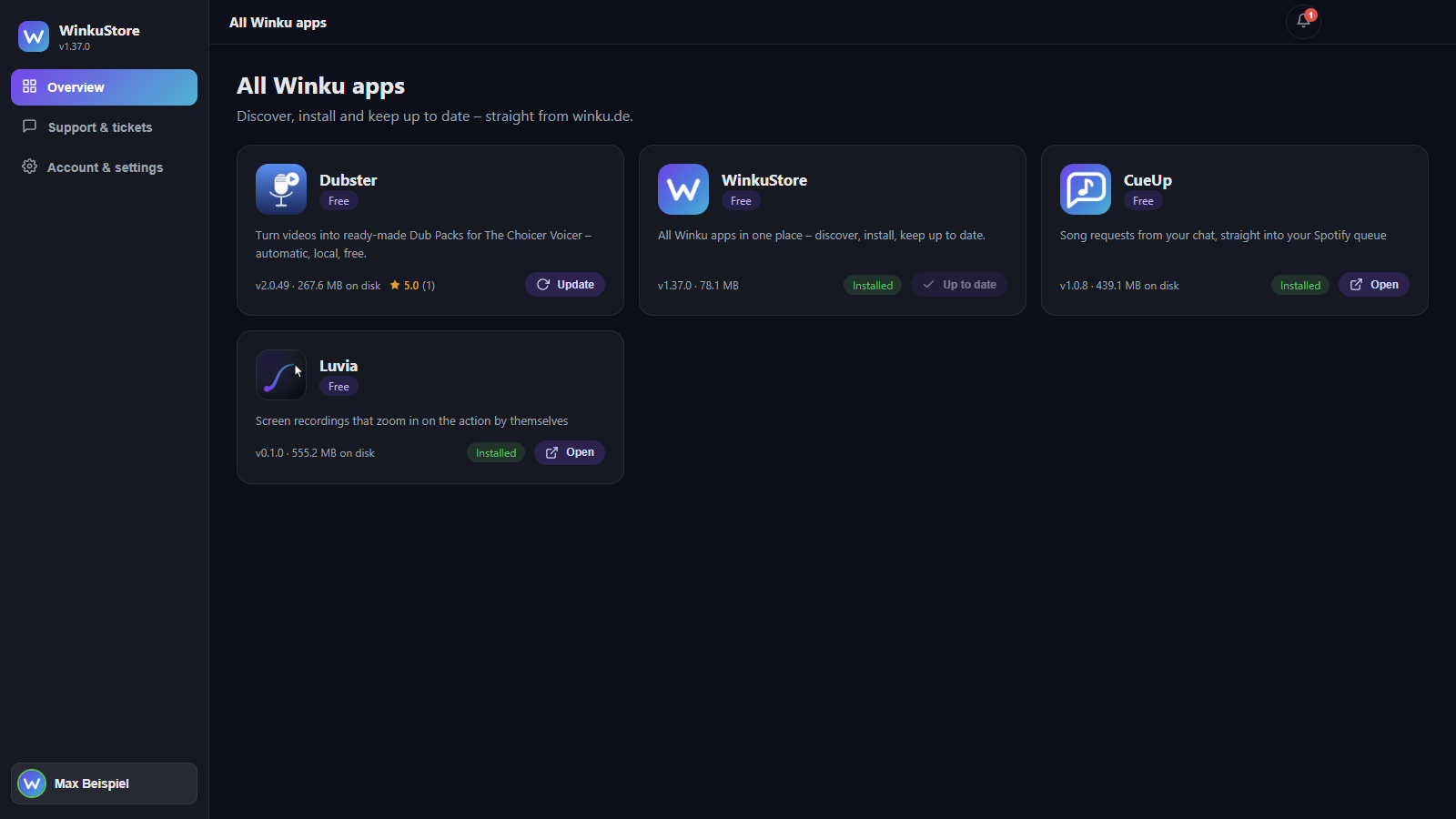
WinkuStore is the store for every Winku program: discover, install and keep them up to date – with product pages, screenshots, reviews and automatic updates.
Was WinkuStore kann
All Winku apps in one place – discover, install, keep up to date.
Everything in one place
All Winku apps with descriptions, screenshots, features, ratings and changelog – exactly as on winku.de.
Install and remove again
Pick an app and install – the store downloads, verifies and sets it up. Removing works the same way, optionally including the app data.
Automatic updates
The store keeps itself and your apps up to date in the background. You decide whether it may.
Verified downloads
Every file is checked against its SHA256 checksum and its signature before installation. A download can be cancelled at any time.
Choose your update channel
Stable or beta – for everything at once or per app. Older versions can be installed from the version archive.
Works offline
Data loaded previously stays available, even without an internet connection.
Older versions (67)
| v1.45.0 23.08.2026 |
WinkuStore-Setup-1.45.0.exe · 78,0 MB Herunterladen Show changesBeta and development builds now show up in the store.
|
| v1.44.0 23.08.2026 |
WinkuStore-Setup-1.44.0.exe · 78,0 MB Herunterladen Show changesAutomatic sign-in at startup.
|
| v1.43.0 23.08.2026 |
WinkuStore-Setup-1.43.0.exe · 78,0 MB Herunterladen Show changesUpdate channels stay reliably up to date.
|
| v1.42.0 22.08.2026 |
WinkuStore-Setup-1.42.0.exe · 78,0 MB Herunterladen Show changesAll app marks are now perfectly sharp.
|
| v1.41.0 22.08.2026 |
WinkuStore-Setup-1.41.0.exe · 78,0 MBNot available Show changesUpdate channels: multiple choice instead of a switch.
|
| v1.40.0 22.08.2026 |
WinkuStore-Setup-1.40.0.exe · 78,0 MBNot available Show changesA sharper Winku mark.
|
| v1.39.0 22.08.2026 |
WinkuStore-Setup-1.39.0.exe · 78,1 MBNot available Show changesButtons now feel like they respond to being pressed.
|
| v1.38.0 22.08.2026 |
WinkuStore-Setup-1.38.0.exe · 78,1 MBNot available Show changesA tidier version archive.
|
| v1.37.0 22.08.2026 |
WinkuStore-Setup-1.37.0.exe · 78,1 MBNot available Show changesIf you check for updates yourself, you get them.
|
| v1.36.0 22.08.2026 |
WinkuStore-Setup-1.36.0.exe · 78,1 MBNot available Show changesPre-releases and announced apps are now recognisable as such.
|
| v1.35.0 22.08.2026 |
WinkuStore-Setup-1.35.0.exe · 78,1 MBNot available Show changesConsistent wording around signing in.
|
| v1.34.1 22.08.2026 |
WinkuStore-Setup-1.34.1.exe · 78,1 MBNot available Show changesA more honest message when signing in through another app fails.
|
| v1.34.0 22.08.2026 |
WinkuStore-Setup-1.34.0.exe · 78,1 MBNot available Show changesSign in through another Winku app – with your own access.
|
| v1.33.0 22.08.2026 |
WinkuStore-Setup-1.33.0.exe · 78,1 MBNot available Show changesThe sign-in button is now named consistently everywhere.
|
| v1.32.0 22.08.2026 |
WinkuStore-Setup-1.32.0.exe · 78,1 MBNot available Show changesThe sign-in button now behaves correctly without an internet connection.
|
| v1.31.0 22.08.2026 |
WinkuStore-Setup-1.31.0.exe · 78,1 MBNot available Show changesOpen installed apps directly, sign in with one click.
|
| v1.30.0 22.08.2026 |
WinkuStore-Setup-1.30.0.exe · 78,1 MBNot available Show changesTwo corrections.
|
| v1.29.0 22.08.2026 |
WinkuStore-Setup-1.29.0.exe · 78,1 MBNot available Show changesWithout a sign-in the store now shows only the sign-in screen.
|
| v1.28.0 22.08.2026 |
WinkuStore-Setup-1.28.0.exe · 78,0 MBNot available Show changesA consistent sign-in screen and a check that spots empty windows.
|
| v1.27.0 22.08.2026 |
WinkuStore-Setup-1.27.0.exe · 78,0 MBNot available Show changesDownloads and messages in one place.
|
| v1.26.0 22.08.2026 |
WinkuStore-Setup-1.26.0.exe · 78,0 MBNot available Show changesStart several downloads at once – with a queue.
|
| v1.25.0 22.08.2026 |
WinkuStore-Setup-1.25.0.exe · 78,0 MBNot available Show changesStreamer mode is left alone now.
|
| v1.24.0 22.08.2026 |
WinkuStore-Setup-1.24.0.exe · 78,0 MBNot available Show changesCleanup, and a check that keeps an old fault from returning.
|
| v1.23.0 22.08.2026 |
WinkuStore-Setup-1.23.0.exe · 78,0 MBNot available Show changesSelf-update reliable again.
|
| v1.21.0 22.08.2026 |
WinkuStore-Setup-1.21.0.exe · 78,0 MBNot available Show changesUpdate channels are now clearly visible.
|
| v1.20.0 22.08.2026 |
WinkuStore-Setup-1.20.0.exe · 78,0 MBNot available Show changesInstallations can be cancelled.
|
| v1.19.3 22.08.2026 |
WinkuStore-Setup-1.19.3.exe · 78,0 MBNot available Show changesConsent now covers every user of a machine.
|
| v1.19.2 22.08.2026 |
WinkuStore-Setup-1.19.2.exe · 78,0 MBNot available Show changesConsent handling follows the new winku specification.
|
| v1.19.1 22.08.2026 |
WinkuStore-Setup-1.19.1.exe · 78,0 MBNot available Show changesAnonymous usage figures and identifiable downloads.
|
| v1.18.1 22.08.2026 |
WinkuStore-Setup-1.18.1.exe · 78,0 MBNot available Show changes1.18.1: Consent to the terms and privacy policy is now requested in the right place – once, before you install your first app, instead of at every sign-in. It covers every app you install through WinkuStore. |
| v1.18.0 22.08.2026 |
WinkuStore-Setup-1.18.0.exe · 78,0 MBNot available Show changesNew in 1.18.0: When signing in you now explicitly agree to the terms and the privacy policy – with links to both texts. Without that consent no sign-in takes place, and the time of your consent is recorded so it stays traceable. |
| v1.17.1 22.08.2026 |
WinkuStore-Setup-1.17.1.exe · 78,0 MBNot available Show changes1.17.1: When switching languages, the account and support sections stayed in the previous language – that is fixed. The placeholder details for streamer and screenshot mode now come centrally from winku so they look the same across all Winku apps. |
| v1.17.0 22.08.2026 |
WinkuStore-Setup-1.17.0.exe · 78,0 MBNot available Show changesNew in 1.17.0: The store now notices new versions on its own while it is open – it checks the small version files every five minutes instead of reloading the whole catalogue. The overview updates quietly in the background. Fixed: Installing an older version from the version history failed because the signature file could not be found. Tidied up: Account and settings now share a single menu entry, and under Support the form for a new request appears right away instead of an empty page. |
| v1.16.0 22.08.2026 |
WinkuStore-Setup-1.16.0.exe · 78,0 MBNot available Show changesNew in 1.16.0: Streamer mode now sets itself up. The store reads the port and password directly from your OBS installation – nothing to type in. One click on "When live" is enough, and as soon as you start streaming in OBS, your email address and account name disappear across all Winku apps. If remote control is still switched off in OBS, the store now says exactly what to do – including a button to check again. |
| v1.15.0 22.08.2026 |
WinkuStore-Setup-1.15.0.exe · 78,0 MBNot available Show changesNew in 1.15.0: The store now checks right before every download whether the shown version is still the current one. If a newer one has been released in the meantime, it asks instead of simply installing something else. If a version has been withdrawn, that is stated in plain language – along with an offer to install the current one. If you deliberately pick an older version from the history, that choice is respected. |
| v1.14.1 22.08.2026 |
WinkuStore-Setup-1.14.1.exe · 78,0 MBNot available Show changes1.14.1: Privacy fix. Automatic error reports could previously contain your account name or email address – both are now reliably removed, along with paths and access keys. |
| v1.14.0 22.08.2026 |
WinkuStore-Setup-1.14.0.exe · 78,0 MBNot available Show changesNew in 1.14.0: Store updates now go through reliably – the installer handles the switch itself, without helper windows in the background. If an update still does not arrive, the store notices on the next start, skips that version and waits for a newer one instead of retrying endlessly. Also: the user display at the bottom left now shows your avatar with a colour-coded status, and a new screenshot mode replaces personal details with neutral placeholders – handy for captures and streams. |
| v1.13.2 22.08.2026 |
WinkuStore-Setup-1.13.2.exe · 78,0 MBNot available Show changes1.13.2: Small maintenance fix with no visible changes. |
| v1.13.1 22.08.2026 |
WinkuStore-Setup-1.13.1.exe · 78,0 MBNot available Show changes1.13.1: Clearer download messages. If a version has been withdrawn, that is now stated exactly – instead of a confusing message about a faulty checksum. Incomplete downloads are also detected, and simultaneous downloads no longer interfere with each other. |
| v1.13.0 22.08.2026 |
WinkuStore-Setup-1.13.0.exe · 78,0 MBNot available Show changesNew in 1.13.0: Streamer mode. It hides your email address and account name – permanently if you like, or automatically as soon as you go live with OBS. The setting applies to all Winku apps at once. Also: account and support are now their own sections in the sidebar, the update channel can additionally be set per app, ratings appear immediately instead of loading late, and switches and the account display have been reworked. |
| v1.12.3 21.08.2026 |
WinkuStore-Setup-1.12.3.exe · 78,0 MBNot available Show changes1.12.3: Updating the store itself works reliably again. Until now the installation failed because parts of the program were still running while files were being replaced – and a console window briefly flashed up. The store now closes completely, installs the new version in the background and restarts automatically. |
| v1.12.2 21.08.2026 |
WinkuStore-Setup-1.12.2.exe · 78,0 MBNot available Show changes1.12.2: Minor display corrections. Release notes are now shown with correct special characters throughout – in the overview, on product pages and in the version history. |
| v1.12.1 21.08.2026 |
WinkuStore-Setup-1.12.1.exe · 78,0 MBNot available Show changes^1.12.1:^ Important^ repair^ -^ in^ versions^ 1.11.1^ to^ 1.12.0^ the^ window^ stayed^ empty^ after^ starting.^ Please^ update^ to^ this^ version.^ |
| v1.12.0 21.08.2026 |
WinkuStore-Setup-1.12.0.exe · 78,0 MBNot available Show changesNew in 1.12.0: The version history is now grouped into version series instead of one endless list - open the series first, then the individual version. Versions that are no longer available are marked as such. Your account now clearly shows that you are signed in via winku. |
| v1.11.2 21.08.2026 |
WinkuStore-Setup-1.11.2.exe · 78,0 MBNot available Show changes1.11.2: The update channel can now really be switched inside the store - it shows which channels are available for your account and warns before a switch that cannot be undone. |
| v1.11.1 21.08.2026 |
WinkuStore-Setup-1.11.1.exe · 78,0 MBNot available Show changes1.11.1: The update channel can now be switched between stable and beta right in the settings. The store also correctly updates itself when you click its own update, the update check now states clearly whether a new version is ready, and the divider below the header again runs to the window edge. |
| v1.11.0 21.08.2026 |
WinkuStore-Setup-1.11.0.exe · 78,0 MB Herunterladen Show changesNew in 1.11.0: If an app is running, the store now asks before closing it for the update - instead of the update failing without explanation. Automatic updates no longer skip running apps silently but retry later. Error messages are now shown in plain language instead of error codes. |
| v1.10.2 21.08.2026 |
WinkuStore-Setup-1.10.2.exe · 78,0 MBNot available Show changes1.10.2: Important update fix - the store used to get stuck when an offered version was withdrawn: it kept announcing the old one and no longer showed newer releases. Every check is now re-evaluated and the currently available version is always offered. |
| v1.10.1 21.08.2026 |
WinkuStore-Setup-1.10.1.exe · 78,0 MBNot available Show changes1.10.1: Polish for the new look - the window bar now blends in properly, notifications and dialogs are opaque again, and the sidebar shows your avatar and name side by side. |
| v1.10.0 21.08.2026 |
WinkuStore-Setup-1.10.0.exe · 78,0 MBNot available Show changesNew in 1.10.0: WinkuStore now follows the unified winku look - with a sidebar, new colours and a clearly visible indicator showing whether you are connected with your winku account. Settings now have their own page. |
| v1.9.2 21.08.2026 |
WinkuStore-Setup-1.9.2.exe · 78,0 MBNot available Show changes1.9.2: Important update - fixes an issue where valid updates were rejected by mistake. After this version updates work reliably again. |
| v1.9.1 21.08.2026 |
WinkuStore-Setup-1.9.1.exe · 78,0 MBNot available Show changes1.9.1: Important security update - digital signature verification now works reliably. Previously valid updates could be rejected by mistake. Please install. |
| v1.9.0 21.08.2026 |
WinkuStore-Setup-1.9.0.exe · 78,0 MBNot available Show changesNew in 1.9.0: If something goes wrong while downloading or installing, the store now reports the problem automatically and anonymously to the winku team - so issues get fixed faster without you having to do anything. |
| v1.8.1 21.08.2026 |
WinkuStore-Setup-1.8.1.exe · 78,0 MBNot available Show changesNew in 1.8.1: Cleaner interface - notifications now appear collected in the bell at the top right instead of a banner, and there is a settings page right in the app: automatic store updates in the background (installed on close), automatic app updates, notifications on/off, language and update channel at a glance. |
| v1.8.0 21.08.2026 |
WinkuStore-Setup-1.8.0.exe · 78,0 MBNot available Show changes1.8.0: Updates are now digitally signed and will be distributed efficiently - only what actually changed needs to be downloaded. Staged rollouts are now also handled exactly as planned. |
| v1.7.3 21.08.2026 |
WinkuStore-Setup-1.7.3.exe · 78,0 MBNot available Show changes1.7.3: Security update - downloads are now verified with a digital signature in addition to the checksum, and new versions can be rolled out gradually. The store also fully manages the shared winku base component. |
| v1.7.2 21.08.2026 |
WinkuStore-Setup-1.7.2.exe · 78,0 MBNot available Show changes1.7.2: Technical update - WinkuStore will centrally manage the shared winku base component (agent) for all Winku apps and keep it up to date automatically. Nothing visible changes for you. |
| v1.7.1 21.08.2026 |
WinkuStore-Setup-1.7.1.exe · 78,0 MBNot available Show changes1.7.1: The store now also checks for updates regularly while it is open (every 30 minutes and when returning to the window) - lightweight in the background, without disturbing the interface. Newly released versions appear without restarting the store. |
| v1.7.0 21.08.2026 |
WinkuStore-Setup-1.7.0.exe · 78,0 MBNot available Show changesNew in 1.7.0: Release channels! As a beta tester or developer (enabled by the winku team) you are automatically offered pre-release versions - labelled accordingly in the version archive. For everyone else nothing changes, you stay on the stable channel. |
| v1.6.1 21.08.2026 |
WinkuStore-Setup-1.6.1.exe · 78,0 MBNot available Show changes1.6.1 fixes updating the store itself: after downloading, WinkuStore now closes cleanly, installs the new version in the background and restarts automatically. |
| v1.6.0 21.08.2026 |
WinkuStore-Setup-1.6.0.exe · 78,0 MBNot available Show changesNew in 1.6.0: After switching to an older version the store now correctly shows your installed version and offers the update again. New uninstall button right on the app page - optionally removes settings and app data too (clean uninstall) and also cleans up duplicate old installations. |
| v1.5.0 20.08.2026 |
WinkuStore-Setup-1.5.0.exe · 78,0 MBNot available Show changesNew in 1.5.0: Manage your account right in the store - change your password and upload or remove your avatar (reviewed by the winku team). Also new: support tickets! Create requests to the winku team directly in the app, see all your tickets with replies and write back - the same system as on the website. |
| v1.4.0 20.08.2026 |
WinkuStore-Setup-1.4.0.exe · 78,0 MBNot available Show changesNew in 1.4.0: Reviews have arrived - average and count right on the app page, one click shows all individual reviews. The store also shows disk space requirements before installing, and installs now use each app's official silent settings. |
| v1.3.0 20.08.2026 |
WinkuStore-Setup-1.3.0.exe · 78,0 MBNot available Show changesNew in 1.3.0: The store now opens instantly, your winku sign-in is shared across all Winku apps on this PC (sign in once), account dialog with avatar via click on your name, display of the actual disk space used by installed apps, and groundwork for public reviews. |
| v1.2.0 20.08.2026 |
WinkuStore-Setup-1.2.0.exe · 78,0 MBNot available Show changesNew in 1.2.0: Fresh look with the Winku logo and a modern title bar, sign-in with your winku account, ratings right inside the store, updates now run quietly in the background, older versions can be installed on demand, and changelogs are neatly collapsible. |
| v1.1.0 20.08.2026 |
WinkuStore-Setup-1.1.0.exe · 77,9 MBNot available Show changesNew in 1.1.0: WinkuStore now shows all Winku apps with product pages (screenshots, features, FAQ, changelog), automatically detects installed versions and supports German and English. |
| v1.0.0 20.08.2026 |
WinkuStore-Setup-1.0.0.exe · 77,9 MBNot available Show changesErste Version von WinkuStore: Programme suchen, installieren, deinstallieren und aktuell halten - mit allen Details zu jedem Programm. |
Reviews
No reviews yet – be the first to review WinkuStore.
WinkuStore in action
 Product page with ratings, screenshots and features
 Version history with changelog ? grouped by release series
 Settings with automatic updates and streamer mode
 Account: signed in via Winku, with update channel
How it works
Download & install
Get the WinkuStore setup, install it, start it.
Sign in
Sign in once with your Winku account – it applies to all Winku apps.
Pick an app
Open any Winku app to see all its details, ratings and versions.
Install
Before your first installation you confirm the terms and privacy policy once. After that one click is enough: download, verify, install.
Stay up to date
New versions arrive automatically in the background.
WinkuStore 1.46.0
Free · Windows installer · SHA256-verified and digitally signed.
Download nowWhat’s new in 1.46.0
The product page now shows the name of the program at the top.
- Until now only the tagline was there – you read "Turn any video into a dub pack." and were never told the program is called Dubster.
- The name now comes first in large type, the tagline smaller below it, the description last.
System requirements
- Windows 10/11 (64-bit), no administrator rights required
- A Winku account for installing – browsing works without one
- Internet connection for sign-in and downloads – previously loaded content stays available offline
- About 280 MB of free space for the store
Verify download (SHA256)
For advanced users: the file’s checksum must match exactly — this confirms the download is unchanged.
8e9aa13264265a801b923267e4e38f8de45c6bb64bf5748f8d50b0eae374b9e9Verify on Windows (PowerShell): Get-FileHash "WinkuStore-Setup-1.46.0.exe" -Algorithm SHA256
Frequently asked questions
What does WinkuStore cost?
Nothing, WinkuStore is free.
Which systems are supported?
Windows 10 and 11, 64-bit. No administrator rights required.
Do I need an account?
Not for browsing, but yes for installing. Signing in applies to all Winku apps – once is enough.
Why am I asked something before my first installation?
Once per device you confirm the terms and the privacy policy. That confirmation covers every app you install through the store; neither the store nor an installed app asks again afterwards.
Where does the app information come from?
Live from the public Winku catalogue – the same content as on the website.
Are the downloads safe?
Every file is verified against its SHA256 checksum and its signature before installation. If anything does not match, it is discarded instead of installed.
Can I cancel a download?
Yes, while it is downloading. The partial file is removed. Once the installation itself is running it is finished – cancelling midway would leave a half-replaced installation.
Do I get updates?
Yes, automatically in the background – and you decide whether your apps update themselves too. The update channel can be set for everything or per app.
Can I go back to an older version?
Yes, through an app's version archive, as long as that version is still offered.
Where do I get help?
Right in the store under “Support”: create a ticket there and see the replies. Alternatively at winku.de/support.
WinkuStore is not affiliated with OBS or the other providers mentioned and is neither endorsed, reviewed nor sponsored by them. All names and trademarks mentioned belong to their respective owners.