
Record tutorials.
Luvia does the rest.
Record your screen and zoom in on the action automatically: the result is a modern video with smooth camera moves – no video editing. Automatic explanations follow after the first release.
Was Luvia kann
Screen recordings that zoom in on the action by themselves
Record instead of edit
Luvia records your screen and what you do, and turns it straight into a finished video. No timeline, no post-production.
Zoom in on what matters
Wherever you click, the camera moves in smoothly and back out again. Viewers see exactly the spot you mean.
Motion that looks expensive
Spring-based camera moves with motion blur instead of hard jumps – the result looks hand-animated.
Stays on your machine
Recording, analysis and rendering all happen locally. Nothing is uploaded and no account is required.
Free, no watermark
No subscription, no watermark in the finished video.
Planned: explanations that write themselves
After the first release: Luvia reads which element you used through the Windows accessibility interface and describes the step in words. The groundwork is measured – 21 of 25 clicked controls produced usable text (84 %), and around 87 % across ten programs.
Older versions (3)
| v0.1.2 23.08.2026 |
Luvia-Setup-0.1.2.exe · 132,4 MB Herunterladen Show changesLuvia 0.1.2 — läuft ohne vorherige Installation von .NETBehoben
Geändert
Trotz mitgelieferter Laufzeit ist der Installer kleiner als 0.1.1: Nicht benötigte Dateien und Symboldateien sind nicht mehr im Paket. |
| v0.1.1 22.08.2026 |
Luvia-Setup-0.1.1.exe · 144,4 MBNot available Show changesLuvia 0.1.1 — Studio, saubere Bühne und ein deutlich schnellerer ExportNeu: Studio zum Nachbearbeiten
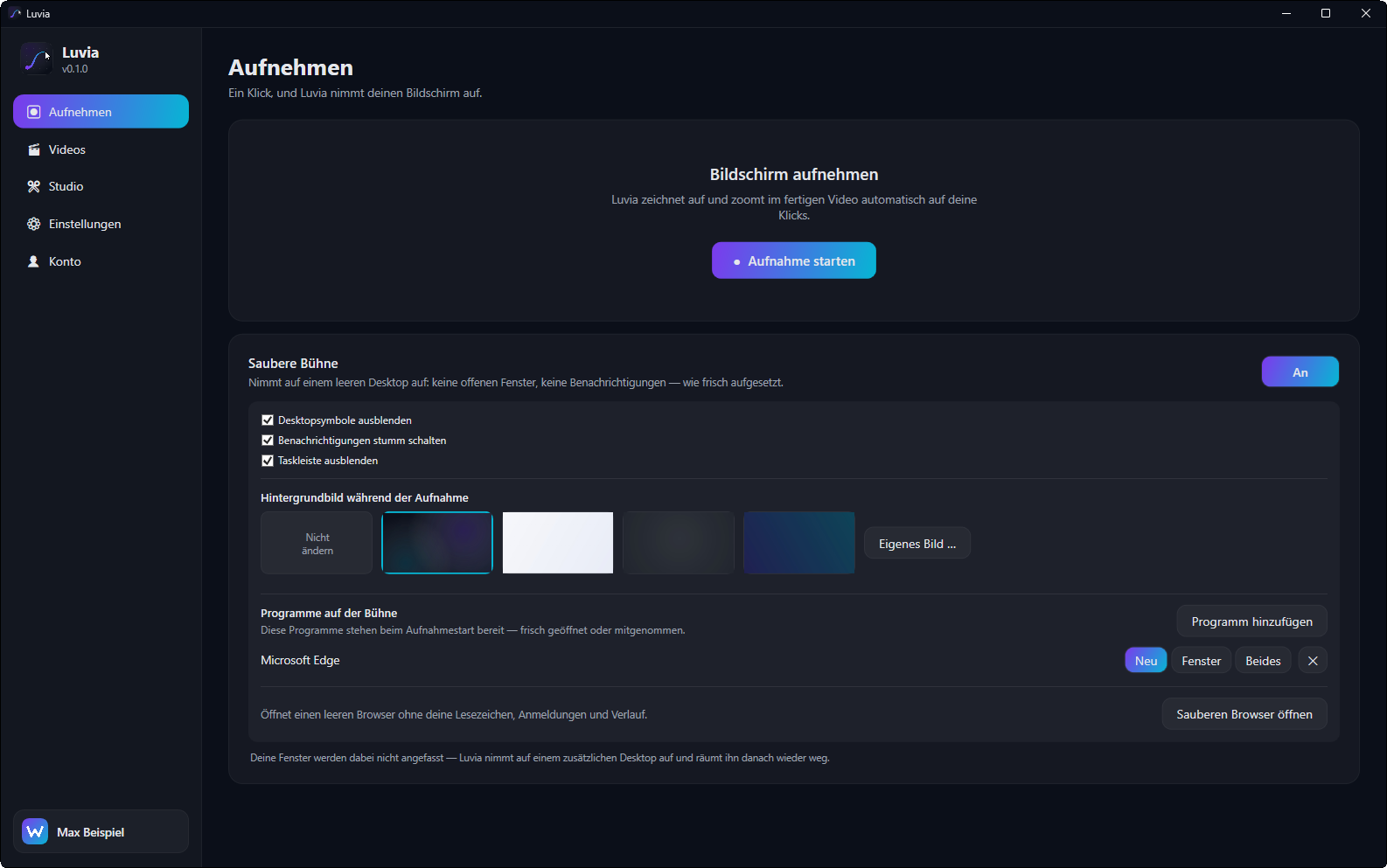
Neu: Saubere Bühne
Schneller und schärfer
Einstellungen
Behoben
Sonstiges
|
| v0.1.0 21.08.2026 |
Luvia-Setup-0.1.0.exe · 132,0 MBNot available Show changesLuvia 0.1.0 — Erste Testversion
|
Reviews
No reviews yet – be the first to review Luvia.
Luvia in action
 Im fertigen Video f?hrt die Kamera weich an das angeklickte Bedienelement heran.
 Studio: Zeitleiste mit Filmstreifen, Zoom-Momenten, Ton- und Textspur.
 Alle Aufnahmen mit Vorschaubild ? bei Mauskontakt l?uft eine kurze Vorschau.
 Einstellungen f?r Bildrate, Aufl?sung, Qualit?t, Zoom-St?rke sowie Mikrofon und Wiedergabeger?t.
 Anmeldung mit dem Winku-Konto, Update-Kanal und Versionsverlauf.
How it works
Start recording
Pick a window or your whole screen and go.
Work as you normally would
Luvia remembers clicks, input and the elements you used.
Generate the video
Zoom moves, explanations and transitions are created automatically.
Polish
Adjust individual steps, rewrite text, export.
Luvia 0.1.3
A development build: meant for trying out, not for everyday use. Bugs, crashes and data loss are possible.
Free · Windows installer · SHA256-verified and digitally signed.
Download nowWhat’s new in 0.1.3
Luvia 0.1.3
Neu
- Aufnahmen löschen. Jede Aufnahme hat jetzt einen Löschen-Knopf. Gelöscht wird in den Papierkorb — ein Fehlgriff kostet dich nicht die Arbeit eines Nachmittags.
- Bildrate frei wählbar. Statt nur 30 und 60 gibt es jetzt 24, 30, 48, 60, 90 und 120 — und ein Feld für einen eigenen Wert. Darunter steht, was die Wahl für Flüssigkeit, Dateigröße und Rechenzeit bedeutet.
Besser
- Anmeldung beim Start. Bist du in einem anderen Winku-Programm angemeldet, übernimmt Luvia das jetzt zuverlässig — auch dann, wenn das andere Programm beim Start noch nicht bereit war. Und wer sich anmeldet, während Luvia schon läuft, muss nicht mehr neu starten.
- Das leere Studio erklärt sich. Statt eines grauen Satzes steht dort jetzt, was als Nächstes zu tun ist, mit einem Knopf, der dich hinführt: zum Aufnehmen, wenn es noch gar keine Aufnahme gibt, und sonst zu deinen Videos.
- Programme auf der sauberen Bühne. Die drei Möglichkeiten hießen „Neu", „Fenster" und „Beides" — woran man den Unterschied erkennen sollte, war nicht ersichtlich. Jetzt sagen sie, was sie tun: vorher öffnen, Fenster mitnehmen oder beides. Der zugehörige Satz steht sichtbar darunter.
- Kästchen und Rückfragen im gleichen Gewand. Die Auswahlkästchen waren die hellgrauen von Windows und standen wie ein Fremdkörper in der dunklen Oberfläche. Ebenso die Rückfrage vor dem Löschen: Sie erscheint jetzt im Programm statt als Systemfenster.
Behoben
- Die Studio-Seite lag als einzige außerhalb des Seitenrandes und klebte an der Seitenleiste.
- Die untere Leiste im Studio zeigte „Video exportieren", obwohl gar keine Aufnahme geöffnet war.
System requirements
- Windows 10/11 (64-bit)
- Multi-core processor recommended – rendering uses the available processing power
- Free disk space for the recording and the finished video
Verify download (SHA256)
For advanced users: the file’s checksum must match exactly — this confirms the download is unchanged.
e16520408a517c66ce867685b8c95b2bb748c340fe02d632a2589da7132d8de3Verify on Windows (PowerShell): Get-FileHash "Luvia-Setup-0.1.3.exe" -Algorithm SHA256
Why this did not exist before
Frequently asked questions
What does Luvia cost?
Luvia is free, with no subscription and no watermark.
Do my recordings stay private?
Yes. Recording, analysis and rendering happen entirely on your machine; nothing is uploaded.
Can Luvia already describe what I do?
Not yet. The first release is the recorder with automatic zoom; the written explanations come afterwards. The groundwork is measured: 21 of 25 clicked controls produced usable text (84 %), and around 87 % across ten programs.
What about programs without labels?
That affects web content and drawing canvases. Image recognition is planned as a fallback for those cases; otherwise you can add the text by hand.
Do I need video editing skills?
No. That is the whole point: the finished video comes out of the recording, and reworking it is possible but not necessary.
When is the download available?
Luvia is in development. The groundwork has been verified and the first version is being built – it will appear here once it is ready.
Windows is a trademark of Microsoft Corporation. Luvia is not affiliated with Microsoft and is neither endorsed nor reviewed by Microsoft.