
Song requests from chat.
Without the chaos.
Your viewers redeem channel points and request a song – CueUp finds it and puts it in your Spotify queue. If anything goes wrong, they get their points back automatically.
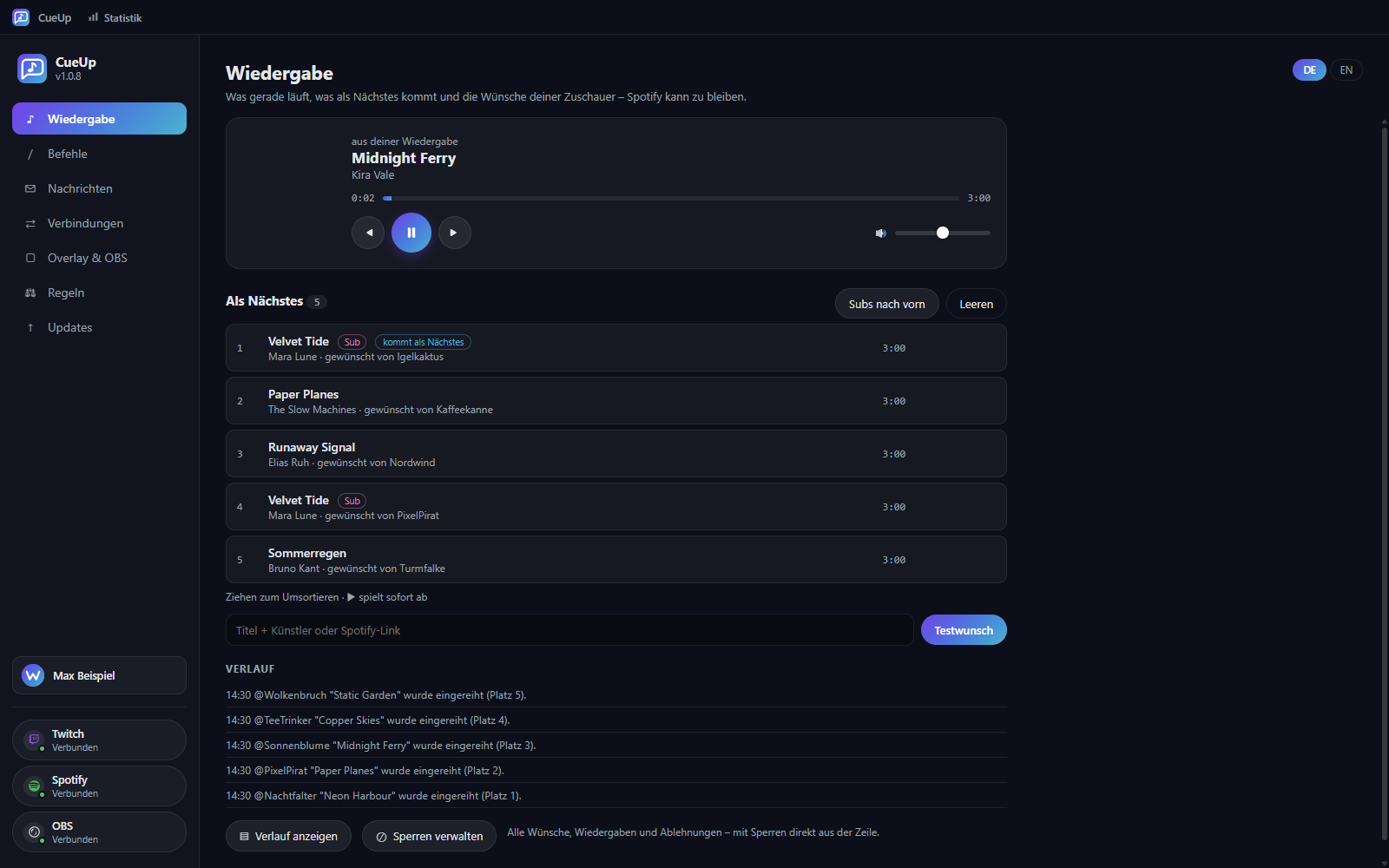
Was CueUp kann
Song requests from your chat, straight into your Spotify queue
Requests via channel points
Viewers redeem a reward and type their request. CueUp recognises the track – a Spotify link works too.
Straight into the queue
The song goes into your Spotify queue automatically when its turn comes. No copying, no switching windows.
Points back when something fails
Track not found, no active playback device, no Premium? The redemption is rejected, the points are returned automatically – with a clear reason in chat.
Moderation on your terms
Per-viewer cooldown, maximum length, queue limit, block lists for songs, artists and viewers, explicit-content filter.
Overlay for OBS
Shows title, artist, cover art, progress and who requested the song. Set up in OBS with one click.
Safe for your VOD
Optionally the music runs on its own audio track that stays out of the recording – so your VOD doesn't get muted.
Stats about your requests
Who requests what, how much music played and what got rejected – including the most popular songs and artists.
History and blocks in one place
Every request traceable, and songs, artists or viewers can be blocked straight from the row – and unblocked just as easily.
Older versions (13)
| v1.0.14 23.08.2026 |
CueUp-Setup-1.0.14.exe · 120,0 MB Herunterladen Show changesYou now decide which updates you get – and you have to sign in less often. • Update channels with checkboxes: you always get Stable. Want to see what's coming sooner, tick Beta or Development as well. Anything your account isn't cleared for is shown with the reason next to it instead of quietly missing. • If you are signed in to another Winku app, CueUp is signed in at startup too. No more sign-in screen just because the connection to Winku is down for a moment. • On the Stream Deck: the action list now shows real icons instead of grey placeholders, and the key shows what is playing even when nobody requested it – your own playback or a music video, for example. Blocking works there too. • New app icon. It now looks the same everywhere – in the window, on the taskbar, in shortcuts and in the preview for your overlay – and stays sharp at small sizes. |
| v1.0.13 23.08.2026 |
CueUp-Setup-1.0.13.exe · 120,0 MBNot available Show changesYou now decide which updates you get – and you have to sign in less often. • Update channels with checkboxes: you always get Stable. Want to see what's coming sooner, tick Beta or Development as well. Anything your account isn't cleared for is shown with the reason next to it instead of quietly missing. • If you are signed in to another Winku app, CueUp is signed in at startup too. No more sign-in screen just because the connection to Winku is down for a moment. • On the Stream Deck: the action list now shows real icons instead of grey placeholders, and the key shows what is playing even when nobody requested it – your own playback or a music video, for example. Blocking works there too. • New app icon. It now looks the same everywhere – in the window, on the taskbar, in shortcuts and in the preview for your overlay – and stays sharp at small sizes. |
| v1.0.12 23.08.2026 |
CueUp-Setup-1.0.12.exe · 120,0 MBNot available Show changesYou now decide which updates you get – and you have to sign in less often. • Update channels with checkboxes: you always get Stable. Want to see what's coming sooner, tick Beta or Development as well. Anything your account isn't cleared for is shown with the reason next to it instead of quietly missing. • If you are signed in to another Winku app, CueUp is signed in at startup too. No more sign-in screen just because the connection to Winku is down for a moment. • New app icon. It now looks the same everywhere – in the window, on the taskbar, in shortcuts and in the preview for your overlay – and stays sharp at small sizes. |
| v1.0.11 23.08.2026 |
CueUp-Setup-1.0.11.exe · 120,0 MBNot available Show changesYou now decide which updates you get. • Update channels with checkboxes: you always get Stable. Want to see what's coming sooner, tick Beta or Development as well. Anything your account isn't cleared for is shown with the reason next to it instead of quietly missing. • New app icon. It now looks the same everywhere – in the window, on the taskbar, in shortcuts and in the preview for your overlay – and stays sharp at small sizes. |
| v1.0.10 22.08.2026 |
CueUp-Setup-1.0.10.exe · 120,1 MB Herunterladen Show changes1.0.10 · 23.08.2026 Fixed: The "Sign in with Winku" button did nothing on some computers. The cause was an older version of the Winku background app – CueUp now copes with it and signs you in anyway. And if something does go wrong, the reason is shown instead of the button simply doing nothing. Also fixed: in that situation CueUp showed the sign-in screen even though you were already signed in. |
| v1.0.7 22.08.2026 |
CueUp-Setup-1.0.7.exe · 120,1 MBNot available Show changesThe preview under "Overlay & OBS" still showed the old app icon. It now matches the one used everywhere else. The app icon also got a lot smaller – 53 instead of 404 kilobytes, at the same resolution and without a single pixel looking different. |
| v1.0.6 22.08.2026 |
CueUp-Setup-1.0.6.exe · 120,1 MBNot available Show changesYour block lists now stay on your computer. They are no longer synced with your winku account – they contain names of viewers who know nothing about it. So that you can still move them to a second computer, there are two new buttons under the rules: "Save block lists" and "Load block lists". Loaded entries are added to your existing ones, nothing is overwritten. CueUp also finds your agreement to the legal texts when it was recorded for the whole device, and the stats can finally be sent to winku even when you are signed in through the shared winku account. |
| v1.0.5 22.08.2026 |
CueUp-Setup-1.0.5.exe · 120,1 MBNot available Show changesUpdates now install more reliably. Until now the installation could fail while CueUp had not fully shut down yet – the old version stayed in place and it looked like a download problem even though the download was fine. The installation now waits until CueUp is really closed. Your agreement to the legal texts is also found when it was given under a different user account on this machine. On a shared computer you were previously asked again for no reason. |
| v1.0.4 22.08.2026 |
CueUp-Setup-1.0.4.exe · 120,1 MBNot available Show changesCueUp now reliably asks for your agreement only when nobody has agreed yet. If you have confirmed it once in any winku program, that settles it – even if the legal texts have been revised since. You are asked again only when winku explicitly requires it, not because a sentence was corrected. |
| v1.0.3 22.08.2026 |
CueUp-Setup-1.0.3.exe · 120,1 MBNot available Show changesCueUp has a new icon: a speech bubble with a note inside – the song request coming out of chat. The old one had a problem you only saw in the taskbar: the queue lines touched the note heads, and since both were white lines on the same gradient, they blurred into a single blob at small sizes. The new mark uses two clearly separated shapes and stays readable down to 16 pixels. |
| v1.0.2 22.08.2026 |
CueUp-Setup-1.0.2.exe · 120,1 MBNot available Show changesCueUp no longer asks for your agreement if you installed it through WinkuStore – you agree there once and that covers everything. Only a standalone install still asks. CueUp now also reports anonymous usage figures: program starts, how many requests and songs played, and whether an update went through. That lets winku spot early when a version has trouble somewhere. Nothing identifying is included – no names, no titles, no paths. |
| v1.0.1 22.08.2026 |
CueUp-Setup-1.0.1.exe · 120,1 MBNot available Show changesOn start-up CueUp now asks once for your agreement to winku's terms of use and privacy policy. Only then does it continue – so you know where you stand from the beginning. We also state plainly what CueUp reports to winku: usage figures, meaning requests, plays, play time and the most popular songs and artists. Your viewers' names, their Twitch IDs, avatars and chat messages are not included and stay on your machine. |
| v1.0.0 22.08.2026 |
CueUp-Setup-1.0.0.exe · 120,1 MBNot available Show changesThe first release of CueUp is here. Your viewers request songs via channel points or chat, and CueUp puts them into your Spotify queue – at the right moment, not all at once. If something goes wrong, they get their points back automatically and learn why in chat. What is included: • Playback and queue in one place: current song, what comes next, play, pause, skip and volume. Spotify can stay closed. • Moderation on your terms: cooldowns, maximum length, per-viewer limits, block lists for songs, artists and viewers. You can block straight from the queue, and a blocked song that plays anyway is skipped at once. • An overlay for OBS with its own editor window: drag elements, write your own texts, live preview. You can scale it for your stream without the picture turning blurry. • Chat commands with your own prefix, each one switchable, plus a vote to skip. • Stats: who requests what, how much plays and what got rejected – with a history of every request. • Streamer mode: while you are live, account name, avatar and viewer names disappear from the display. • Keep the music out of the recording so your VOD does not get muted. You need Windows, a winku account and Spotify Premium – without Premium, Spotify does not allow queue control. |
Reviews
No reviews yet – be the first to review CueUp.
CueUp in action
 Statistik: wer wünscht sich was, wie viel läuft und was abgelehnt wurde
 Verlauf aller Wünsche und Wiedergaben – sperren direkt aus der Zeile
 Moderationsregeln: Wartezeiten, Höchstlängen und Sperrlisten
 Chat-Befehle mit eigenem Präfix und Rechten je Befehl
 Overlay für OBS mit Vorschau und eigenem Gestalten-Fenster
 Einrichtung in fünf Schritten: Twitch, Spotify, Kanalbelohnung und OBS
How it works
Connect Twitch
One click, no key to type. CueUp creates the channel point reward for you – or you pick an existing one.
Connect Spotify
Guided setup with ready-to-paste values. CueUp checks the connection right away and tells you what is missing.
Set your rules
Cooldowns, length limits, block lists and chat commands the way you want them.
Go live
Requests come in automatically. The window shows the queue and you can step in at any time.
CueUp 1.0.8
Free · Windows installer · SHA256-verified and digitally signed.
Download nowWhat’s new in 1.0.8
Next to "Show history" there is now "Manage blocks". It shows everything you have blocked at a glance – songs with cover art, artists, and viewers with their avatar – and lets you undo it with one click.
Blocked songs also offer "Unblock and queue": the song is released and put at the end of the queue right away. You are asked first, so nothing starts playing by accident.
This is the first release that ships signed.
System requirements
- Windows 10/11 (64-bit)
- Winku account (free)
- Twitch account with channel points enabled (Affiliate or Partner)
- Spotify Premium
- For the overlay: OBS 28 or newer
Verify download (SHA256)
For advanced users: the file’s checksum must match exactly — this confirms the download is unchanged.
5ac18db0d0f474a340927b0a0c7ab0fbc4dafdecbc96c01bb3a50e4ec2f21317Verify on Windows (PowerShell): Get-FileHash "CueUp-Setup-1.0.8.exe" -Algorithm SHA256
Why not just a bot?
Frequently asked questions
What does CueUp cost?
CueUp is free. You do need Spotify Premium though – without it Spotify does not allow queue control.
Why is Spotify Premium required?
The interface used to queue tracks is reserved for Premium accounts. Without it Spotify refuses, and CueUp returns the channel points automatically.
Does it work without channel points?
Yes. Requests also work through a chat command. Both routes can be switched on and off separately.
What happens with an invalid request?
The redemption is rejected, the points go back to the viewer, and chat shows the reason – for example that the track could not be found.
Will my music get my VOD muted?
In VOD-safe mode the music runs on a separate audio track that is excluded from the recording. One step stays with you: in OBS under Settings → Output (Advanced), set the Twitch VOD track to track 2 – CueUp tells you so when you switch it on. Alternatively CueUp logs the tracks played so you can document them later.
Do I need a Winku account?
Yes, signing in is required. In return your settings are the same on every computer and updates arrive on their own.
Does CueUp run locally or in the cloud?
Playback runs entirely on your Windows PC: search, queue, overlay and moderation need no server. Your Twitch, Spotify and OBS credentials stay encrypted on your machine and are never sent to Winku – nor are your viewers' names, your block lists or your history. What goes to your account: your settings, so they are the same everywhere, and usage figures – requests, plays, play time and the most popular songs.
CueUp is an independent program and is not affiliated with Twitch, Spotify or OBS. It is neither endorsed, reviewed nor sponsored by these providers. The names and trademarks mentioned belong to their respective owners and are used here only to describe which services CueUp works with.